


Create & send an invoice
Build a branded invoice, email it with a link your client can open, and record what's been paid.
Create & send an invoice
Invoices (under Deliver Work) shows everything you’ve sent and what’s still owed.
Creating one
Click Add New Invoice, or bill tracked hours directly with Invoice my time from the Time Tracking page. You build it against a live preview of the finished invoice:
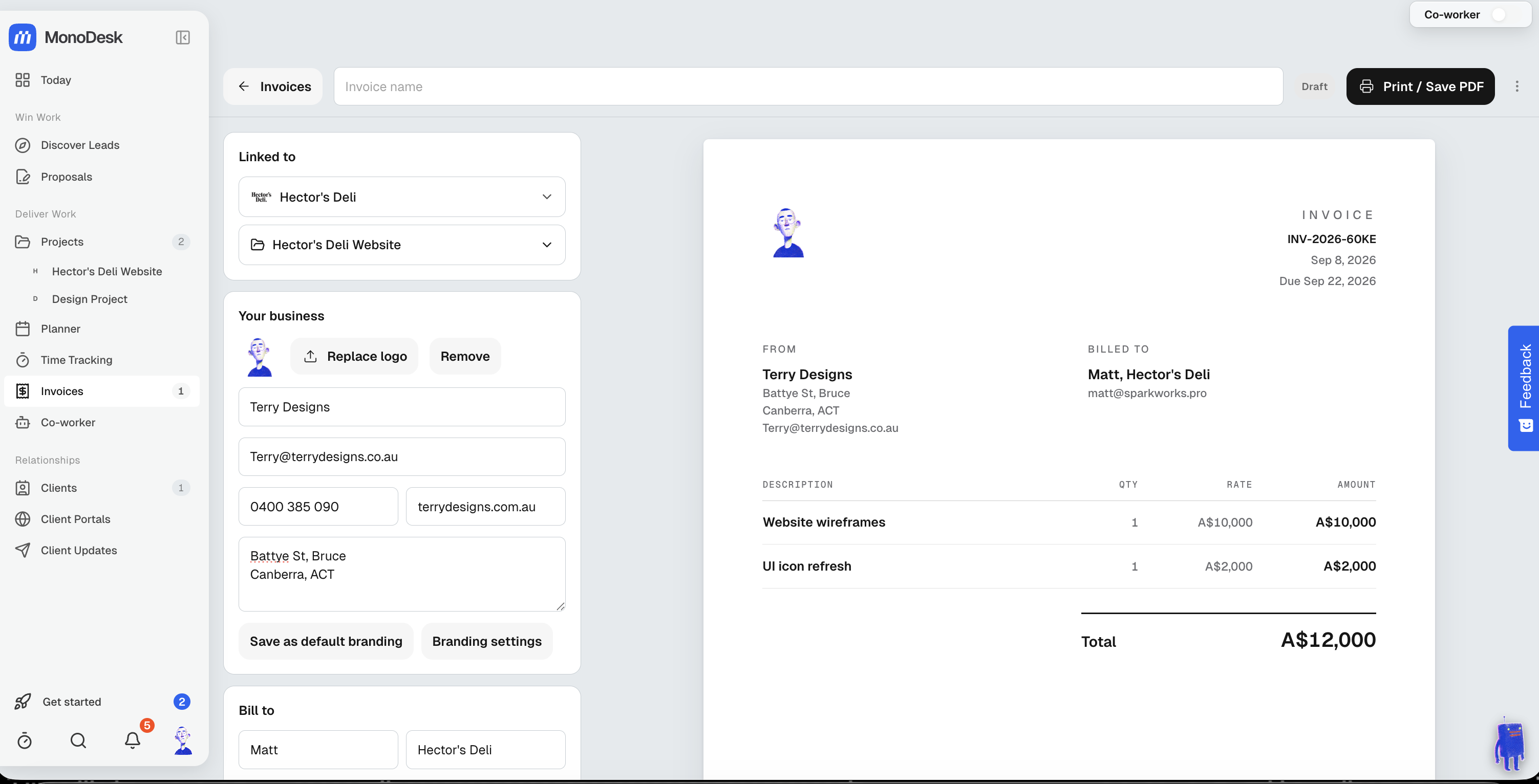
- Linked to the client and project, so the Bill to details fill from the client’s profile
- Your business shows your name and logo from Settings → Branding. Use Manage branding to change them there, or Customise for this invoice in the invoice’s menu for a one-off.
- Add line items with quantity and rate; deposits, part payments, tax and discounts are built in
- Invoice numbers and due dates are filled in for you, and you can change both
Billing from a proposal
Two ways to skip retyping a proposal’s line items:
- Add from proposal, next to Add from library under the line items, lists your accepted proposals, this project’s first. Every priced item comes in ticked, along with any optional extras your client chose.
- Create Invoice in a proposal’s Actions menu drafts a new invoice from it. Choose Invoice the full amount, or Bill a deposit now to list every item but ask for a percentage today. Nothing is sent.
Sending it
Click Share invoice at the top of the editor:
- Send invoice emails it to your client
- Copy link copies a link to the invoice that your client can open without signing in
- Print / Save PDF if you’d rather send a file yourself
Send invoice fills in To with the email under Bill to. Add up to five more addresses under CC (optional), separated by commas. Everyone on the email can see who else got it. Change the Subject if you like and add a personal Message. Preview email shows exactly what your client will receive.
The email carries your branding and a button to view the invoice online. When your client replies, it goes to the business email on the invoice, or to your account email if the invoice doesn’t have one. Once the email is on its way, a draft invoice is marked Sent.
MonoDesk sends what you see, so a blank field won’t stop you sending. The link shows your saved changes as you make them. While an edit is half-finished, such as a line with no name or no lines at all, your client keeps seeing the version you last shared until you finish it or share again.
Email history in the invoice’s menu lists each email, who it went to and whether it was delivered.
Invoice links
Each link works for 90 days, and Send invoice shows the date it expires. If a link has a week or less left when you copy or send the invoice, MonoDesk makes a fresh one.
If your client opens an expired link, they can click Email me a new link. The new link only ever goes to the email address under Bill to on the invoice, never to whoever asked.
To stop every link to an invoice working, open Invoice options in the Send invoice window and choose Disable links.
Invoice numbers
By default each new invoice gets a number like INV-2026-K3M7: the year plus four random letters and digits. These don’t count up.
To use your own scheme, go to Settings → Invoices and choose Choose my own under Invoice numbers. Set a prefix, whether to include the year, and Counting up or Random code. To carry on from another system, enter the number you want next under Next number. Only an admin can change these settings.
You can still type a different number into Invoice number under Invoice details on any single invoice.
Following the money
Every invoice moves from Draft to Sent to Paid. Overdue invoices are flagged once they pass their due date, and invoices with some money in show as Partially paid.
Use Log a Payment in the invoice’s menu to record money as it comes in. Mark as Paid, in the same menu, records whatever is still owed as a payment dated today, so the balance goes to zero. You’ll see it under Payments received, where you can edit or remove it. If you move the invoice off Paid before editing that payment, MonoDesk removes it again.
The invoice’s menu groups everything else: Related (View Project, View Client), Branding, Manage (Duplicate Invoice, Make Recurring, Rename Invoice, Archive Invoice) and Accounting.
Have accounting software you want MonoDesk to integrate with? Let us know at support@monodesk.com.
For what this looks like across MonoDesk, see Invoices.
Last updated October 23, 2026
