


The Planner: your week, not your backlog
Most project tools show you everything. The Planner shows you this week, because that's what actually matters when you're doing the work.


TL;DR: Most project tools show you everything. The Planner shows you this week, because that’s what actually matters when you’re doing the work.
Open most project management tools on a Monday morning and here’s what you see: 47 tasks across 6 projects, sorted by project, some of them overdue, some of them from three months ago when you thought you’d have time for that, and a handful that you’ve already done but forgot to tick off.
That’s not a plan. That’s a list of everything you’ve ever thought you might do. It tells you nothing useful about today, or this week, or whether you’re going to hit Friday’s deadline.
This is the backlog problem. And it’s the thing the Planner is designed to fix.
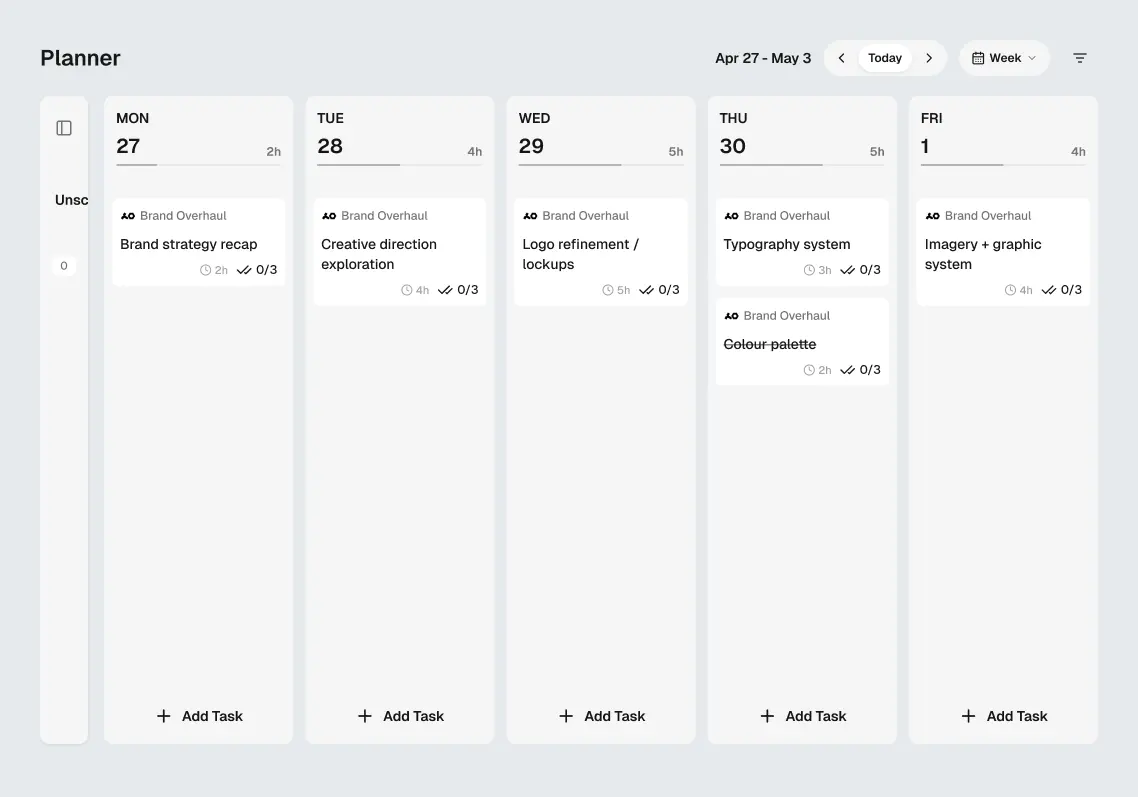
The Planner is scoped to your week. Not your entire project history. Not your eventual someday list. This week. You pull tasks in from your active projects, slot them into days, and see what your week actually looks like before it happens.
The thinking behind this comes down to one observation: freelancers don’t work in sprints. They work in weeks. Client deliverables land on Fridays. New briefs come in on Mondays. The rhythm of freelance work is weekly, not quarterly. So why are most project tools built around a backlog and a board?
Here’s how it works in practice. On Monday morning, you open the Planner. You can see all your active projects in a panel on the side. You drag the tasks that need to happen this week into the days they belong to. If Wednesday looks overloaded, you know that now, before Wednesday. You move something to Thursday. You start the week with a realistic picture of what’s achievable.
That’s it. That’s the whole thing.
A few things we deliberately left out: there’s no hour-by-hour scheduling. No Gantt chart. We’re not trying to build a calendar replacement. The Planner is for answering one question: “What am I doing this week and does it fit?” If the answer is yes, you close it and get to work.
Update: time tracking has since shipped, as a timer and a My Time grid that sit alongside the Planner rather than inside it. The Planner still answers the week question; tracking answers the where-did-it-go question.
We think the best productivity tool is one you stop thinking about. The Planner is designed to be a five-minute Monday ritual, not a system to maintain.